
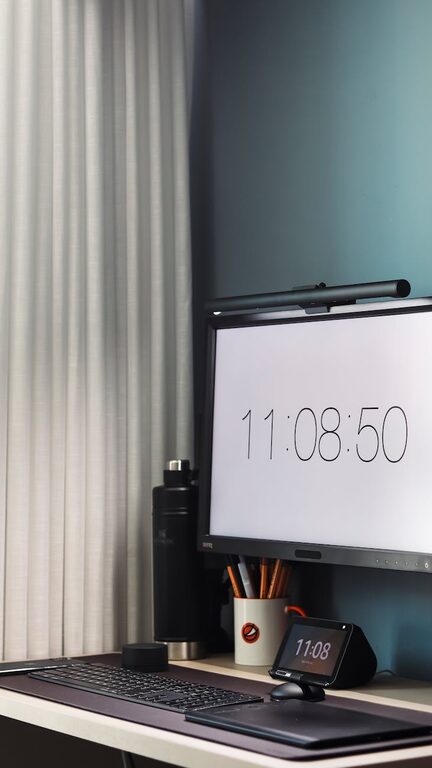
Creating a comfortable and organized home office is essential for maintaining focus and productivity, especially if you spend a significant amount of time working from home. A clutter-free workspace not only reduces stress but also makes it easier to find what you need when you need it. Whether you have a spare room or just a small corner, these tips will help you design a home office space that is both functional and inviting.
Why Organize Your Home Office?
Before diving into practical steps, it’s good to understand the benefits of keeping your home office tidy:
– Reduces distractions: A clean desk helps you focus on your tasks.
– Saves time: When everything has a place, you spend less time searching.
– Boosts creativity: A neat space encourages clearer thinking and fresh ideas.
– Improves mood: A well-organized environment feels more inviting and less stressful.
Assess Your Space and Needs
Start by evaluating the area you have and your work habits.
Determine the Right Location
Choose a spot in your home that’s quiet and receives good natural light if possible. Avoid high-traffic areas to minimize interruptions.
Identify Your Work Essentials
Make a list of items you use daily—computer, notebooks, pens, planner, printer, etc. This will help you prioritize storage and layout decisions.
Declutter Before Organizing
Clearing out unnecessary items is the first step to organization.
– Sort through papers: Recycle or shred old documents. Keep only what’s necessary.
– Digitize where possible: Scan important papers to reduce physical clutter.
– Evaluate supplies: Donate or toss duplicates or items you never use.
– Remove non-work items: Keep personal or unrelated belongings out of your workspace.
Design a Functional Layout
How you arrange your furniture and tools makes a big difference.
Desk Placement
Place your desk to maximize natural light without glare on your screen. Facing a wall can minimize distractions, but if you prefer a view, position accordingly.
Ergonomics Matter
Invest in a comfortable chair and position your monitor at eye level. This reduces strain and helps maintain good posture during long work hours.
Easy Access to Essentials
Keep items you use frequently within arm’s reach. Less-used supplies can be stored away but remain accessible.
Utilize Smart Storage Solutions
Proper storage keeps clutter out of sight and your workspace tidy.
Drawer Organizers
Use trays or dividers for pens, paper clips, and small gadgets. This prevents them from scattering around your desk.
Shelving and Cabinets
Install shelves or bring in a bookcase to store books, binders, and decorative storage boxes.
Filing Systems
Use labeled file folders or boxes for paperwork. Sort documents by category, date, or priority to find things quickly.
Cable Management
Use clips, ties, or cable sleeves to keep cords neat and prevent tangles.
Establish Daily and Weekly Maintenance Routines
Organization is an ongoing process, so build habits to maintain your space consistently.
– Daily tidy-up: Spend 5 minutes at the end of each workday clearing your desk.
– Weekly review: Go through papers and supplies to keep only what you need.
– Digital clean-up: Regularly organize files on your computer to complement your physical workspace.
Personalize Your Space Mindfully
While staying organized, add touches that inspire and motivate you.
– Plants: Small greenery adds freshness and improves air quality.
– Art or photos: Choose images that uplift your mood without cluttering surfaces.
– Desk accessories: Select functional yet attractive items like pen holders or mouse pads.
Maximize Natural and Artificial Lighting
Good lighting reduces eye strain and improves alertness.
– Position your desk near a window if possible.
– Use adjustable desk lamps for focused lighting.
– Choose bulbs with natural light tones rather than harsh fluorescents.
Use Technology to Your Advantage
Several tools can enhance organization and productivity.
– Task management apps: Keep track of to-dos without piles of sticky notes.
– Cloud storage services: Safely store documents and access them from anywhere.
– Wireless devices: Reduce cords with wireless keyboards, mice, and chargers.
Create Zones for Different Activities
If space allows, designate specific areas for various tasks.
– Workstation: Main desk for computer and paperwork.
– Creative zone: Space for brainstorming or craft supplies.
– Reference area: Shelves or stands for books and manuals.
This separation helps keep tasks focused and reduces clutter overlap.
Final Thoughts
An organized home office is achievable with a clear plan and simple habits. Regularly reassess your setup to ensure it continues to meet your needs as your work evolves. By keeping your space clutter-free, ergonomic, and personalized, you’ll create an environment that supports your best and most productive workdays.
—
With these guidelines, anyone can transform a cluttered corner into a productive and peaceful home office that enhances daily work life. Start small, stay consistent, and enjoy the benefits of an organized workspace!